
How Alert Context Supports Screening Operations
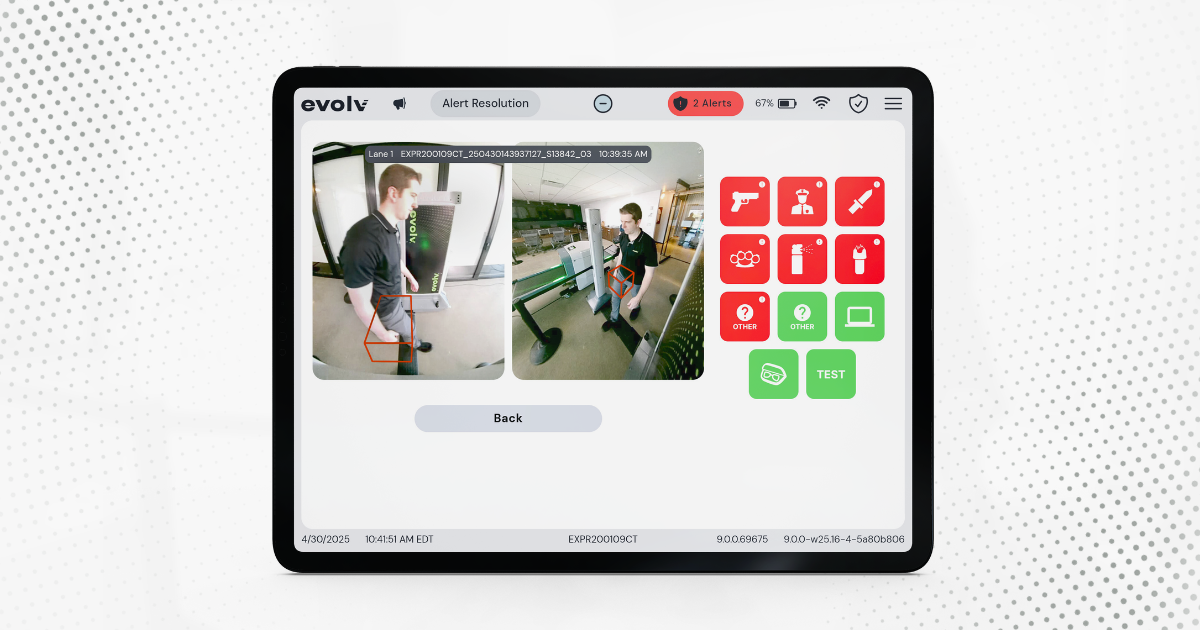
In many walk-through screening systems, a red light simply indicates that something triggered an alert. That’s it.
It does not:
- Identify who caused the alert
- Indicate where to check
- Guide staff on what to do next with precision
In real-world, high-traffic environments, that gap matters.
Where Screening Breaks Down After an Alert
1. No Clear Link Between Alert and Individual
In a busy entrance, people move through continuously. When a light turns red, staff may stop the person who just entered.
- That reaction feels logical, but it is still an assumption
- Provides no reliable way to connect the alert back to a specific person.
If questioned, staff cannot clearly explain how the individual was identified. This opens room for potential bias.
2. Secondary Screening Becomes Guesswork
Once an alert occurs, staff must decide how to respond. This introduces variability:
- Who should be stopped?
- Where should the search focus?
- How thorough should the check be?
Without clear guidance, every alert becomes a small investigation.
3. Hard to Manage Alerts in Motion
Teams are forced into a difficult choice:
Option A: Slow everything down
- Process one person at a time
- Maintain control, but reduce throughput
- Create lines and bottlenecks
Option B: Keep people moving
- Maintain flow
- Risk missing alerts or stopping the wrong person
- Increase uncertainty during peak periods
Neither approach scales effectively in high-volume environments.
4. Additional Coordination May Be Needed
Some operations attempt to compensate by adding personnel:
- One person watches for alerts
- Another directs individuals to secondary screening
While this can help, it increases staffing needs and still does not address ambiguity.
5. Inconsistent Screening Outcomes
Without clear direction:
- Some staff may over-search to be cautious
- Others move quickly to keep lines moving
This leads to inconsistent screening practices and unpredictable operations.
What Changes When Alerts Include Context?
Now consider a different approach. Instead of a red light alone, the system provides visual and situational context tied to the alert.
Key Differences with Directed Alerts
- Immediate Identification
- Staff can see who triggered the alert
- Helps avoid guesswork and bias
- Focused Screening
- Alerts indicate where to look
- Searches can be quick and targeted
- Supporting Throughput
- Staff only stop the relevant individual
- Others can continue walking through
- Supports flow of traffic
- Sequential Alert Management
- Multiple alerts can be tracked and reviewed
- Each alert is tied to a specific individual
- Staff can resolve them in order without losing track of alerts
- Consistent Operations
- Staff know where to focus secondary screening
- Helps avoid variability between staff members
- Supports predictable screening experience
Why Context Matters in High-Throughput Environments
In busy venues, screening performance depends on both accuracy and flow.
When alerts lack context:
- Operation can slow down
- Staff rely on assumptions
- Creates inconsistency
When alerts include clear context:
- Decisions are clear
- Interactions are easy to explain
- Supports throughput
For lower-volume entrances, this same clarity can also support consistent, objective screening practices.
The Shift from Alerts to Actionable Insight
The difference ultimately comes down to usability:
- A red light tells you something happened
- A contextual alert helps you understand what to do next
Evolv Express® was designed with this in mind, pairing alerts with photo-based visual context that shows both the individual and the area of concern. As an early pioneer of this approach, often referred to as the “red box”, Evolv introduced greater clarity into walk-through screening. That clarity, while simple, makes a meaningful difference in environments where staff are responsible for processing large volumes of people in a short amount of time.

3 Minute Read
Share


